Browser extension
SnapGrab
Mark images from the web, edit and compress them on your device, then batch-download as JPEG, PNG, or WebP — without bouncing between tabs and online tools.
Workflow
From page to download.
- Right-click any image on a webpage and choose SnapGrab.
- A badge on the extension icon shows how many images you’ve marked.
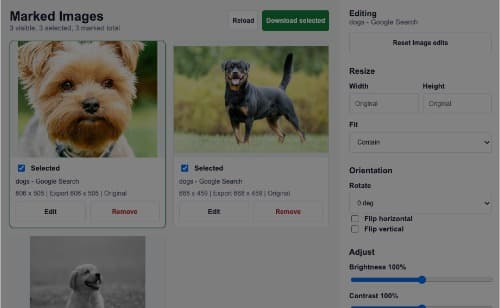
- Click the icon to open the marked-images workspace.
- Filter, edit, select, and hit Download selected.
Features
One focused image workspace.
- Right-click any image → SnapGrab to mark it (toolbar badge shows the count)
- Review everything in one workspace — filter, select, preview, export
- Per-image edits: resize, rotate, flip, brightness, contrast, saturation, grayscale
- Export as JPEG, PNG, or WebP with quality control
- On-device WASM compression (MozJPEG, libwebp, OxiPNG)
- Optional TinyPNG second pass with your own API key
- Batch download with progress, cancel, and collision-safe filenames
- Download original unchanged, copy URL, or open the source page
- Custom download folder + optional per-image file names
- Keyboard shortcuts for speed; dark mode follows system preference
On-device by default
Small files. Private workflow.
Compression
Local WASM codecs re-encode on download — MozJPEG, libwebp, and OxiPNG. No SnapGrab server in the middle.
Want an extra pass? Turn on TinyPNG in Settings and paste your own API key. It’s off by default; image bytes only leave your machine when you enable it.
Privacy-first
- The extension has no account or analytics, and no SnapGrab backend receives your images.
- Marked images and settings stay in Chrome storage on this device.
- Up to 500 marked images, with the newest kept.
- Full details in the privacy policy.
Details
Fast to use. Clear about access.
Keyboard shortcuts
| ← → | Move focus |
|---|---|
| Space | Select |
| ⌘/Ctrl+A | Select visible |
| Delete | Remove |
| ⌘/Ctrl+Enter | Download selected |
| / | Focus search |
Permissions
SnapGrab only requests what it needs for mark → edit → download.
- Context menus
- Adds SnapGrab to the image right-click menu
- Downloads
- Saves original or edited images to your Downloads folder
- Storage
- Remembers settings, marked list, and optional API key on this device
- Notifications
- Brief confirmation when an image is marked
- Host access
- Loads images for previews and exports; optional TinyPNG API only when enabled
Developers
Install from source.
Load the unpacked extension while developing or exploring the code.
- Clone github.com/mickpurple/SnapGrab.
- Run
npm installto vendor the WASM codecs. - Open
chrome://extensions, enable Developer mode, then choose Load unpacked.